
Creating engaging, informative and relevant content for your website, while time-consuming, remains a key way to drive traffic to your site. Articles should be well-thought-out and contain high-value information, not regurgitations of low-value old topics filled with keywords. If you’re going to commit to blogging, you need to adhere to a high standard.
1. Set a schedule
Start by deciding how often you want to post new content. If your goal is to post multiple times a day, focus on creating short to medium length posts. For a schedule of one to two posts per week, consider producing longer, more comprehensive articles. Note that search engines often adjust their crawl speeds based on the consistency of your updates. This means that if you post more often, your site can be indexed more regularly. In addition, search engines prefer longer posts because they are more informative and valuable.
Guidelines for blog post length and frequency:
| Short form | Medium Form | Long form |
| 100-800 words | 800-1500 words | 1500 – 5000 words |
| Daily 4-6 Posts | 1-3 Messages Daily | 1-2 Posts per week |
By creating a clear posting strategy, you can better plan your content creation and align it with your goals. Of course, if you prefer to post less frequently, like once every few weeks, that’s totally fine too. Remember that while this approach may result in less traffic, it may suit your specific goals or target audience.
2. Choose a theme
Choosing topics that match both your brand and your target audience is crucial to maximizing the effectiveness of your blog. Targeting your blog posts to your website’s niche ensures that search engines recognize and associate your site with relevant topics.
For example, if your website specializes in French cuisine, consistently writing about French cuisine and related topics will strengthen search engine engagement with your site. Conversely, posting information about unrelated topics such as vacations to the Maldives can reduce your site’s relevance and negatively impact your search engine rankings.
However, if SEO is not your main concern, feel free to explore topics that interest you.
If you’re ever struggling for ideas, Google Trends can be a valuable resource. By looking at popular search terms, you can discover topics that can be creatively combined with your niche. Search engines pay particular attention to new content related to popular trends.

3. Research
Once you have a solid idea for your blog post, it’s time to start researching.
Start by doing a few searches on your topic to see what similar articles are out there. This can help you angle your post and identify gaps you can fill in existing content.
Data and statistics from reputable sources can greatly improve your article. These facts can support your arguments or provide evidence for your opinions. Be sure to properly cite any references and include links to original sources.
Links to authoritative sites also improve SEO. links to reliable sources such as Wikipediawell-known periodicals or reputable news outlets can positively influence how search engines rank your content. Prepare a list of reliable web pages to cite when writing your article.
4. Create an outline
I find that writing a blog post is easier when you start with an outline. This helps you stay focused on the narrative you want to convey and allows you to organize your ideas into a more cohesive and digestible format.
Start with the project a title and a brief introduction. This entry can then be expanded upon as you design the rest of your outline. Your title should act as the initial hook for the article. Try to make something interesting and attractive that people will want to read. The introduction should be equally enticing, encouraging readers to continue.
Next, make a list key points. These will serve as the main sections of your blog post, with each main point becoming a different section heading.
use it subheadings below each key point to further break down the content and provide additional structure.
As you outline your main points, you’ll think of additional sections to add. You may also find yourself rearranging these points to create a logical flow. This process helps a lot with the overall composition of your blog post.
5. Write the First Draft
Once you’re happy with your outline, start writing your first draft. Expand your reach and complement each main section with detailed content.
At this stage, don’t worry about making it perfect. Focus on getting all your ideas down on paper at once. Resist the urge to improve every sentence as you write; this can significantly slow down your progress. Remember, you can always edit and polish your draft later.
After you’ve written your content, add a summary or conclusion to bring all the information together in a neat little package.
It is also recommended that you write the first draft yourself without relying on artificial intelligence. Your content should reflect your own thoughts and voice. Use AI tools for grammar checks and proofreading, not for creating a first draft.
And don’t forget to add your appropriate links by selecting the appropriate pieces of anchor text to use as links. And make sure those links open in a new tab or window, not on the same page.
6. Edit and revise
Now that you’ve written the main body of your article, it’s time to carefully review each word and sentence. Revise for clarity, correct typos, add new ideas, and delete anything that doesn’t quite fit. This process may require several rounds of editing before you are completely satisfied with the final piece.
A helpful tip to improve the flow of your writing is to read it out loud. Often what sounds great in your head can sound awkward or incomprehensible when spoken. Reading aloud can help you solve these problems and refine your phrasing.
Use editing tools to help you spot spelling and grammar mistakes. Grammarly is a free tool that I use often to help with proofreading. Additionally, AI tools can be useful for rewording sentences to increase readability and improve overall content quality.
7. Add to WordPress
SEO
Before uploading your article to WordPress, be sure to install an SEO plugin to boost your post when published. Log in to your WordPress dashboard, go to “Plugins” > “Add New” and search for “SEO”. I recommend installing and activating “Yoast SEO,” but other options are available.Most SEO plugins are user-friendly and easy to install.

THE EDITOR
WordPress uses the Gutenberg block editor by default, but if you prefer a simpler, classic editing interface, you can install the Classic Editor plugin from WordPress. To do this, go to Plugins > Add New, search for Classic Editor, and install and activate it.

Then go to Settings > Writing and choose your preferred default editor for all users. You can also enable the switch between editors option for users. Be sure to save your settings.

USING THE GUTENBERG EDITOR
If you’re using the Gutenberg editor, go to Posts > Add New. Enter the title of your article in the Add Title field. At the bottom, put “Type / to select block”. Use the toolbar that appears to adjust the formatting as needed. When you are satisfied with the content, click “Save draft” in the upper right corner.

USING THE CLASSIC EDITOR
To add a post using the Classic Editor, go to Posts > Add New. Enter your title in the Title Bar and paste your article into the main content area. Use the editor’s toolbar to adjust the formatting if necessary. Once your post looks good, click the “Save Draft” button on the right.

CATEGORIES, TAGS, SEO
On the right side of the editor, you can select categories and tags for your post. You can also add new categories if needed, but try to keep categories broad and reusable to avoid overly specific or multiple categories.
In the SEO section below the article, add an “SEO Title” if it is different from your main title and a “Meta Description” using relevant keywords. If you’re using Yoast, this section will guide you through the process.

The “Slug” part of your URL is usually generated automatically. Only change it if you know what you’re doing.
Finally, after completing all these steps, don’t forget to click the “Save Draft” button.
8. Add visuals
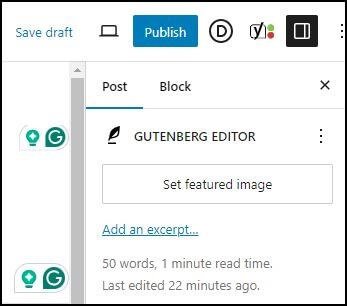
Start by adding a featured image that will appear at the top of your blog post and may also show up in search engine results. Ideally, this description should include the title of your article. WordPress recommends a size of 1200 x 628 pixels for featured images.
To add a featured image, find the “Featured Image” section on the right side of your draft editor and click the button to upload or select an image.
| Gutenberg editor | Classic editor |
 |
 |
When uploading a new image, make sure to fill in the “Alt Text” field. This should provide an accurate representation of the image, which is important for accessibility as it helps visually impaired users who rely on screen readers. Additionally, include a relevant keyword or phrase in the description to boost SEO.
Once you’ve entered your Alt Text, click outside the text box to save it, then click Set Selected Image to finalize your selection.

Add additional images to your blog post to make it more attractive. Use the editor’s tools to adjust and position these images as needed. Remember to add “Alt Text” for each image, including a precise description and key term to improve both accessibility and SEO.
While stock images are perfectly acceptable, it pays to customize them a bit to make them more unique. If you don’t have access to your stock photo account, Pixabay is a great source for free images.
9. Complete and publish
Review your post thoroughly by going through it several times to make any necessary corrections or improvements. This process ensures that your content is polished, error-free, and delivers a clear and compelling message to your readers. Take the time to refine your words, check for grammatical errors, and make sure your ideas are logically organized and easy to follow.
Once you’re happy with your post and are sure it meets your standards, click Publish to publish it on your website. After publishing, check the post on the front to double check that all formats look good. Pay attention to how images, headings, and paragraphs look to ensure a seamless reading experience across all devices.
Then, share your newly published post on social media platforms to reach a wider audience. Create catchy social media headlines and include relevant hashtags to attract more readers. Connect with your followers by encouraging them to share their thoughts or share the post if they find it valuable.
Finally, track the performance of your post using tools like Google Analytics or other traffic monitoring plugins. Analyze traffic, user engagement, and social media shares to understand how well your post is resonating with your audience. This information will help you refine future content and optimize your blog strategy for better results.