A 20 minute conversation with a subject matter expert is easily 3000+ words.
Without a transcription tool, this means going back and forth over the note five or six times to get the quotes exactly right. One hour of your minimum time for a 20-minute call.
And here’s the thing about SME interviews: it’s hard to develop your story angle or figure out where you want to go with just one listen. I need to see the conversation on paper. But if you’re splitting your focus between reaching out to an expert and frantically writing notes, you end up with worse conversations and worse content.
I have used it Otter.ai For my SME interviews, client calls and conference notes from 2020. Here’s whether it’s worth $100 a year for freelance writers who do regular interviews.
How I use Otter
My main use is SME interviews, which I do two to three times a month for clients like The Financial Brand and other fintech publications.
I record every interview (with permission) and it makes all the difference to how the conversation goes. My focus is 100% on the person I’m talking to, not on writing what they say as they say it. I can drop my prepared questions, ask quick follow-ups, and let the conversation flow naturally because I know everything is captured.
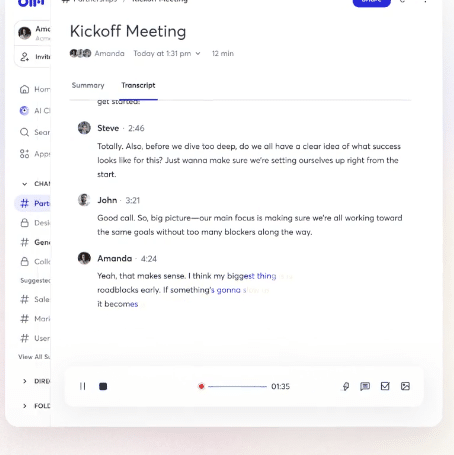
This freedom makes for better interviews, which in turn creates better content.
Except for interviews, I use it otter for a few other things:
- Client briefing calls: For new projects with complex instructions or clients who prefer to be talked through tasks rather than sending written briefings. It also generates receipts when coverage increases or instructions become unclear later. (“I never said I didn’t want X” is easier to apply when you have a transcript.)
- Webinar and conference content: Some clients want me to create content from their webinars, so I’ll take notes as I listen to identify key points and areas to capture for blog posts or social media. The same goes for conference speakers. I can then refer to the full speech, contact them for a follow-up, or use it to develop a proposal that they can be a key SME for.
- Voice notes: Sometimes if I go for a walk idea hits for a pitch or blog postI’ll open Otter on my phone and just talk to him.
What makes Otter worth it?
The time savings are real
Transcripts are available immediately after the call ends. Even with 10 minutes of cleaning for accuracy issues, that’s nothing compared to 60+ minutes of manual transcription.
For my workflow, Otter saves me three to five hours a month. For freelancers with lots of meetings and expert calls, that number can easily be two to five times higher. Otter a speed booster it helps me write faster.
Here’s the ROI math that clicked for me:
Let’s say you get paid $1,200 for a 1,000-word article that includes an SME interview. The work is divided into approximately 1 hour of research, 3 hours of description and writing, and 1 hour of transcript creation. That’s just five hours, or an effective rate of $240/hour.
Now delete that transcript watch. Four hours total, effective rate of $300/hour.
That one the hour was saved Each article is added quickly. If you do three or four interview-based articles a month, Otter pays for itself in the first month.
AI Chat Search
After the call, I can search the transcript for specific topics. If I know an expert is talking about “credit card fraud” or “AI personalization,” I ask the chatbot and it pulls up the relevant sections with summaries.
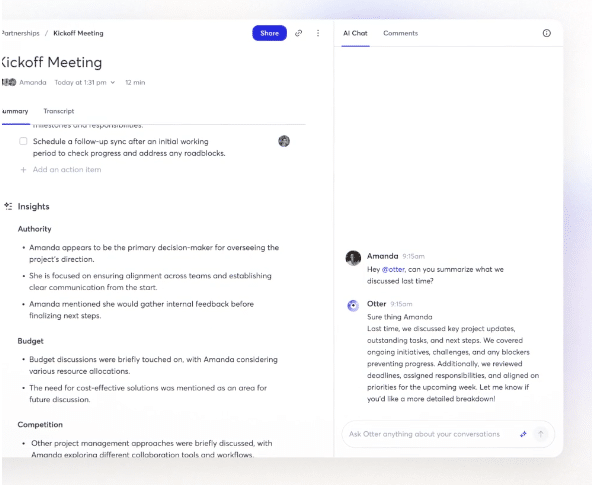
This is very useful when the speaker goes off on tangents or when discussing two connecting points in different parts of the conversation.
Audio Playback is associated with Transcription
You can click on any part of the transcript and the actual recording starts from that point. This is important when something breaks or is clearly wrong. I approve the quote, fix it there, and move on. It adds a bit of time, but not much.
The Free Plan can actually be used
The basic plan gives you 300 minutes per month with a limit of 30 minutes per recording. That’s enough for a call or two a month, or just enough to seriously test whether Otter is a good fit for your workflow before paying anything.
Simple interface
Calendar sync works on your laptop and phone, and there’s no learning curve. Click on the record and get the transcript. I can automatically join him in scheduled Zoom meetings or invite him on the fly.
Learn how to make your first $1,000 in freelance writing (in 30 days or less)
Join over 40,000 people who have taken our 6-part freelance writing course. Sign up below and let’s do it together.
By entering your email address, you agree to receive emails from Location Rebel. We will respect your privacy and you can unsubscribe at any time.
Real Limitations
Speaker Mode Required
If you have headphones connected while recording, Otter only captures your voice, not the other person’s. The recording relies on your computer’s speakers picking up both sides of the conversation.
If you do 100% of your calls at home or use a coworking cubicle, that’s fine. It’s annoying if you need privacy or a quiet environment.
Accuracy is around 80-85%, not perfect
Otter claims up to 95% accuracy, but in real-world situations with SME interviews, I’d guess it’s closer to 80-85%. Names get mixed up, technical terms get weird, and sometimes they get things completely wrong.
But I never take the transcript exactly as written. When I take a quote to use in an article, I click on the transcript, listen to the audio, and check it for accuracy before publishing. This process adds a bit of time, but for three to five calls a month, it’s not significant.
If you were writing regular diary appointments, cleanup time will be added.
Speaker ID May Be Incompatible
Otter tries to identify different speakers, but it’s not always accurate, especially when the voices sound similar or when you’re recording a webinar where you’re not a participant. It labels the speakers as Speaker 1, Speaker 2, Speaker 3 and sometimes guesses wrong. Attribution should be double-checked on multi-speaker recordings.
Why not Human Transcription Services?
There are services that allow you to send the voice to a real person for transcription. Accuracy is better. But they cannot create it immediately.
You send your note, wait three to five days for it to come back. If you’re on a tight deadline—say, you have a week to find an SME, interview, research, and write a draft—you don’t have three to five days to wait for a transcript. That interview forms the basis of your audio recording.
Want faster? Pay in a hurry.
With Otter, I have a transcript after the call is over. Even if I spend 10 minutes cleaning it, I immediately go to the writing stage. No waiting, no extra charge, no deadline stress.
Other AI Transcription Tools
There are alternatives like Fireflies, Fathom, Revand others. I haven’t tested them extensively because Otter has worked for my needs for the past five years. If you do a ton of interviews, I’d recommend taking a few free trials for a week or two and seeing what fits your needs.
Price Breakdown
Basic (free):
- 300 minutes/month
- 30 minute limit per recording
- 3 lifetime audio/video file import
- Live transcription and speaker identification
- Zoom, Google Meet and Teams integration
Pro ($8.33/month/year = ~$100/year):
- 1200 minutes/month
- 90 minute limit per recording
- 10 months of file import
- Advanced search, export and playback
- Zapier integration
Business ($19.99/month billed annually):
- Unlimited notes
- 4 hour limit per shoot
- Custom AI workflows
- Admin features and analytics
for the most freelance writers$100/year Pro is the sweetest place. You get enough minutes for regular interviews, and the 90-minute limit covers longer conversations or webinar recordings.
Who Should Use Otter (And Who Can Skip It)
The best:
- Mid-career freelancers who do SME interviews or client calls a few times a month
- Writers who create content from webinars, podcasts, or conference recordings
- Anyone who wants an affordable, easy way to record conversations without manually transcribing them
You may not need this if:
- You never do interviews or record anything for your work
But even so, the free plan is worth a try. You may find uses you might not expect, such as recording client briefings or capturing ideas on walks.
Judgment
Otter is not perfect. Accuracy requires verification; speaker identification may be difficult and you should use speaker mode. But it saved me a lot of time during five years of SME interviews and client work.
For $100 a year, the cost of about an hour’s worth of work pays for itself almost immediately if you conduct any regular interviews.
The free plan is generous enough to give it a try. Try it on two or three real calls and see if it fits your workflow.

Liz Froment
Liz Froment is a full-time freelance writer and the one who keeps Location Rebel running like a well-oiled machine. If he doesn’t write something informative or witty for his clients, he can probably be found reading a good book.
Learn how to make your first $1,000 in freelance writing (in 30 days or less)
Join over 40,000 people who have taken our 6-part freelance writing course. Sign up below and let’s do it together.
By entering your email address, you agree to receive emails from Location Rebel. We will respect your privacy and you can unsubscribe at any time.